
Discover how to join a FiveM server in both GTA 5 Enhanced and Legacy versions with our comprehensive guide.If you’re new to modding or looking to enhance your multiplayer experience, we provide clear, easy-to-follow steps to get you started on custom servers.
To unlock a world of unique gameplay modes, missions, and communities with FiveM. Follow the following section and dive into the action today:

How to Join a Server After Installing FiveM
Once you’ve successfully installed FiveM on your system, you’re ready to dive into a customised multiplayer experience in GTA 5. Follow these steps to join a server:
- Launch FiveM:
Open the FiveM application from your desktop or start menu. The client will load and automatically detect your GTA 5 installation. - Browse the Server List:
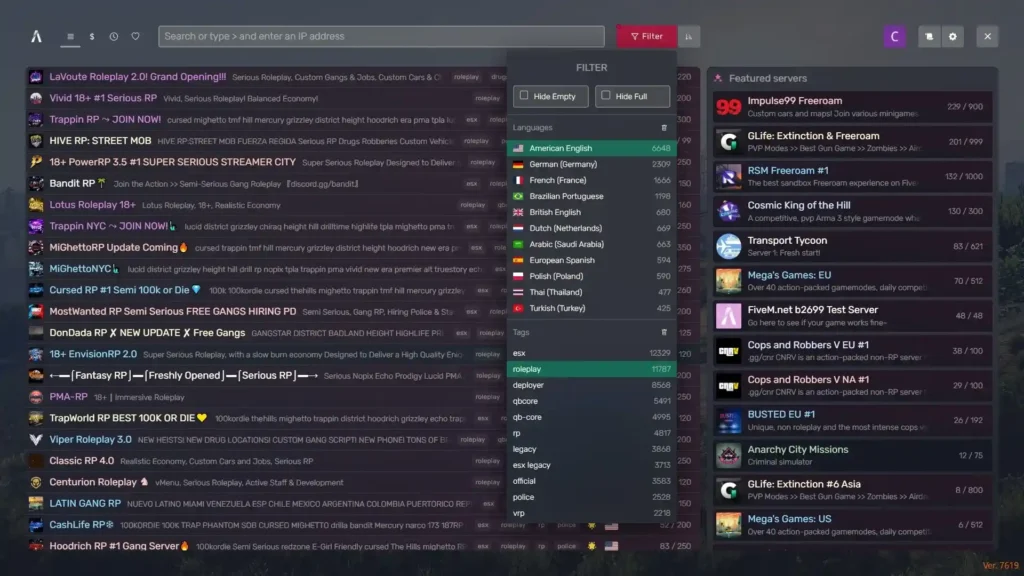
Once FiveM is running, you’ll see a home screen with several options. Click on the “Servers” tab. Here, you’ll find a large directory of available servers. You can filter by game modes, location, and player count, or use the search bar to find specific servers. - Choose a Server:
Scroll through the server list or search for one that interests you. Servers typically feature roleplay, racing, survival, or free-roam modes. Each server will display details such as current players, ping, and mod types, allowing you to pick the best one for your preferences. - Join the Server:
Click on the server you want to join, and a new window will open, displaying more details about the server’s rules, mods, and requirements. If everything looks good, click “Connect” to join. The FiveM client will automatically download any necessary mods required by the server. - Create or Load Your Character:
Depending on the server, you may be prompted to create a new character or load an existing one. Some roleplay servers have in-depth customisation options, while others may require you to follow specific rules. - Start Playing:
Once connected, you’re free to explore and enjoy the game mode of your choice. If you’re roleplaying as a cop, participating in street races, or just exploring custom maps, you’re ready for a new GTA 5 experience.
Quick Tips:
- Bookmark Servers: If you find a server you like, you can bookmark it for easy access in the future.
- Server Requirements: Some servers may have specific mods or resources that need to be installed before you can join. Be sure to follow the instructions provided by the server admins.
Resources:
Helpdesk: